Skip to content
Back to projects

Personal iOS project

Finely

Finely is my current personal iOS project. I am building it as a focused place to explore product-level iOS systems outside a company codebase: finance domain rules, UIKit architecture, persistence, StoreKit, privacy, localization, and assistant behavior grounded in real app data.

UIKit SwiftData StoreKit 2 Coordinator iOS 26.2+ English and French

Product

A healthier way to understand personal money flow

I am designing Finely around the decisions people make every month: what came in, what already went out, what recurring charges are still coming, and whether the month is moving in the right direction. The goal is not to turn finance into a complex dashboard. It is to make everyday money management visible enough to act on.

The interface uses a warm editorial style, but the product logic is practical: signed transaction amounts, recurring subscription rules, budget-month boundaries, account totals, Pro gates, privacy settings, and localized copy.

What the app covers

  • Income, expense, and recurring subscription tracking
  • Current-month balance, upcoming dues, and spending categories
  • Full-history activity timeline with search
  • Advanced statistics, projections, and contextual insights
  • Privacy controls such as amount masking and optional app lock

Screens

How the product surfaces the system

Each main screen is built around a specific job in the finance workflow. The screenshots below are paired with the technical detail that matters for that screen, without turning the project page into implementation notes.

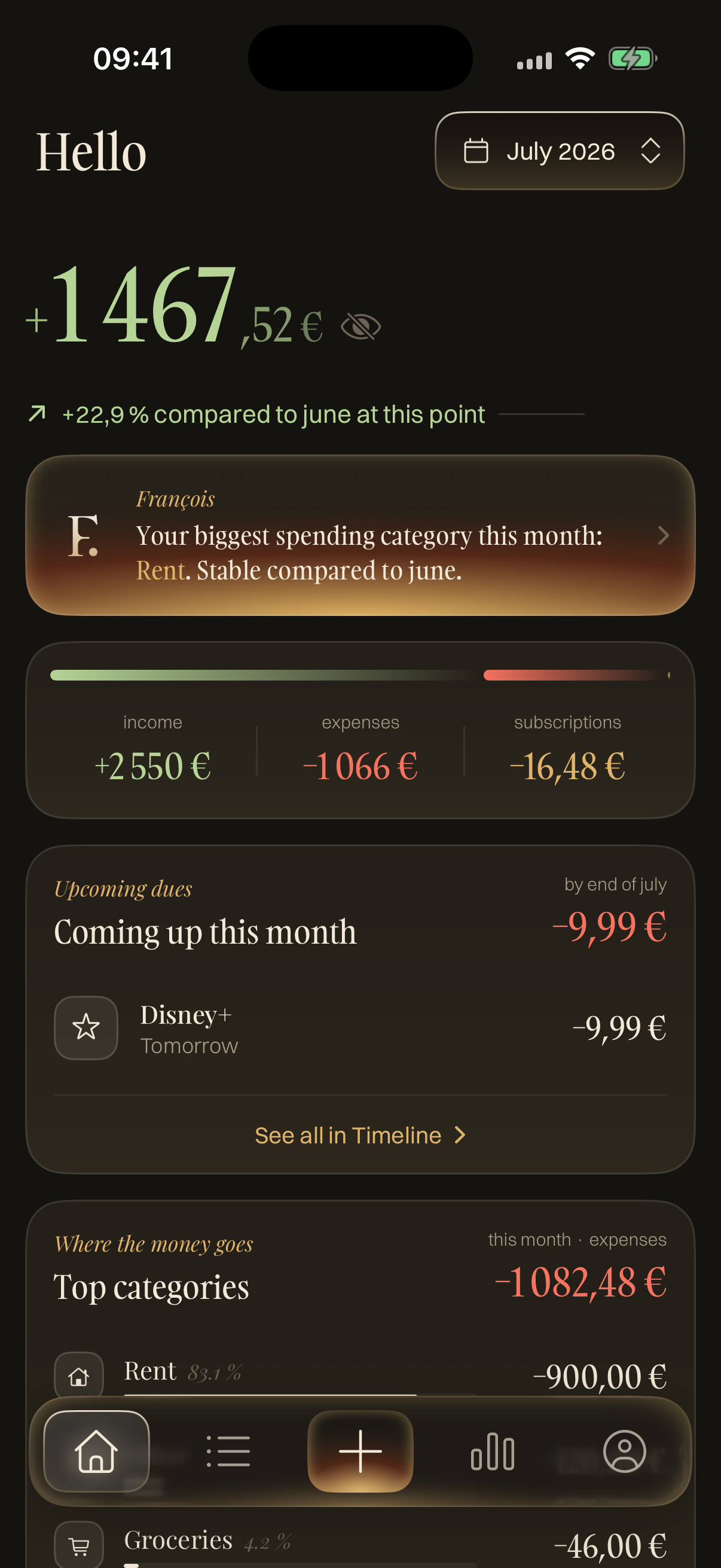
Finely home screen showing balance, monthly insight, income, expenses, subscriptions, and upcoming dues.

Home

A current-month view that turns transactions into decisions.

The main technical decision on Home is to separate lived data from projected data. Materialized charges are real transactions and affect the current balance; upcoming subscription dues are computed from recurrence rules and shown as future pressure without rewriting history early. The assistant-style card follows the same rule: it is generated from app-owned totals and only appears when there is enough month data to avoid weak or misleading insights.

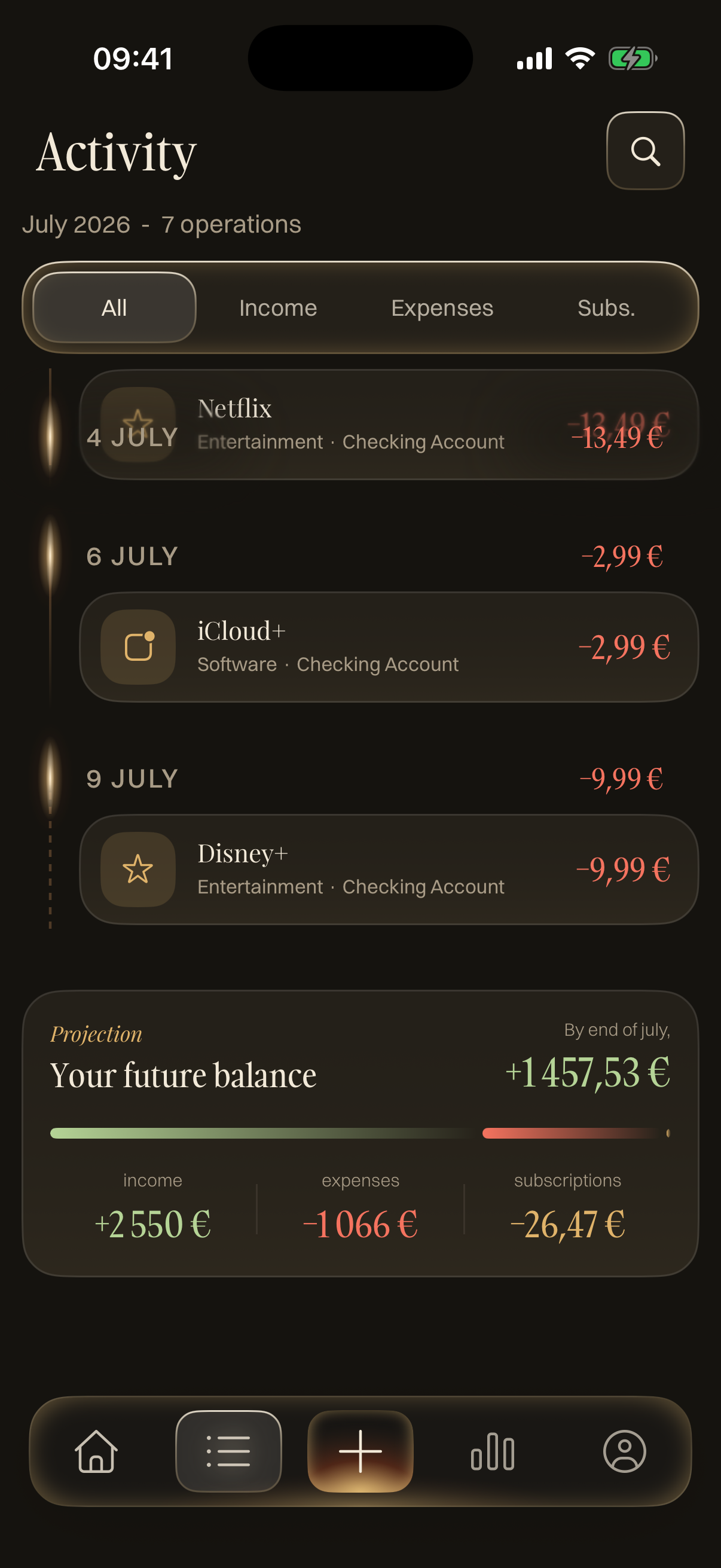
Finely activity timeline grouped by date with filters for income, expenses, and subscriptions.

Activity

A timeline that separates history from forecast.

The interesting part of Activity is the boundary between history and forecast. The timeline can show real transactions alongside upcoming subscription charges, but those two things are not stored the same way. A scheduled charge is a display-only row projected from the subscription rule; when the billing date arrives, the store materializes the real transaction and the diffable timeline swaps it in without a full reload. That keeps the screen useful as a month forecast while preserving a clean audit trail: projected rows are visible, but they are not treated as historical facts.

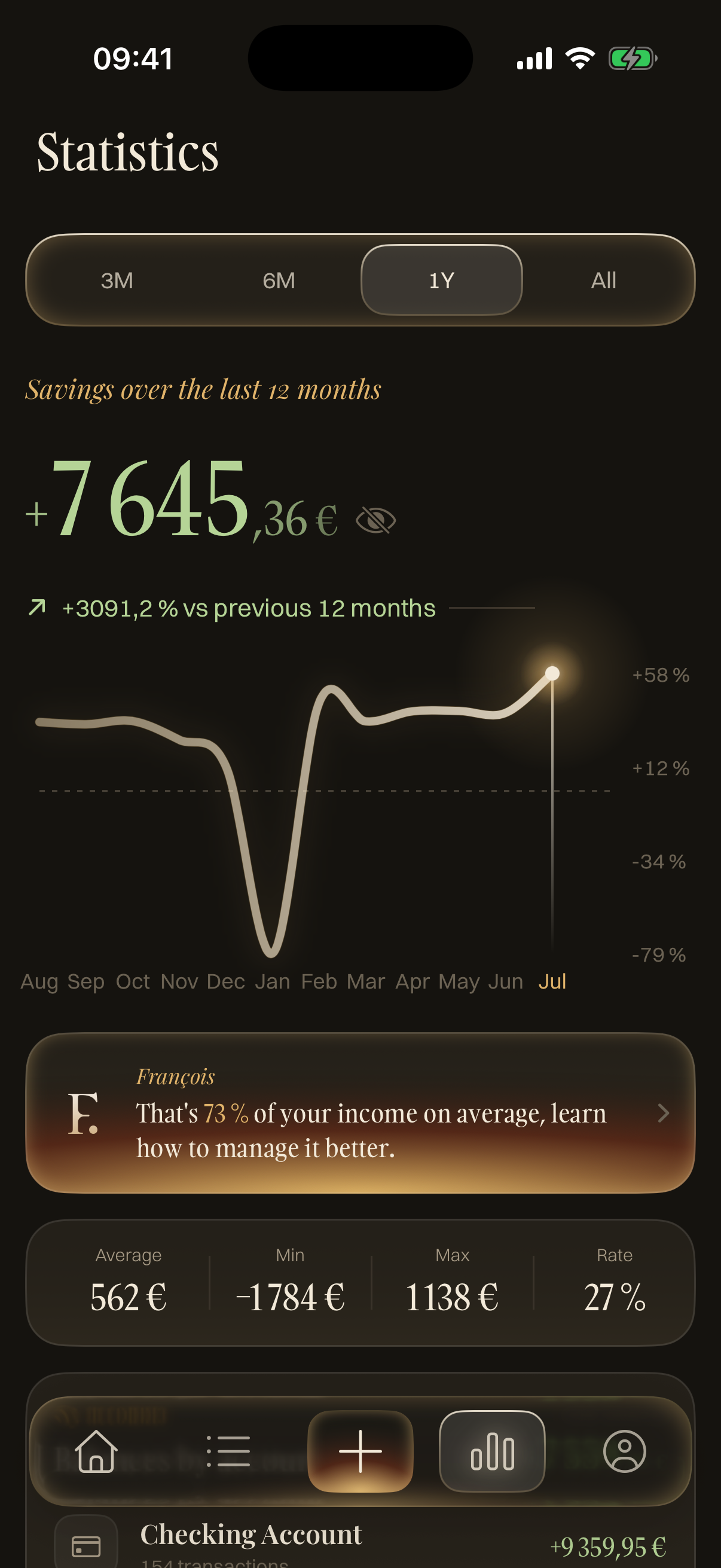
Finely statistics screen with savings over twelve months, chart, assistant insight, and metrics.

Statistics

Pro analytics built from reusable finance engines.

Stats is built as a domain engine rather than a chart screen with calculations inside the view controller. The screen asks for a snapshot for a selected period, and the data layer resolves calendar windows, trims padded history, excludes incomplete months when needed, normalizes subscriptions into monthly run rates, and gates projections until there is enough history. The result is an immutable StatsSnapshot that the UI can render consistently across charts, cards, drill-downs, and insights. I like this approach because finance screens are easy to make visually impressive but hard to keep honest; the important work is deciding when a number is meaningful enough to show.

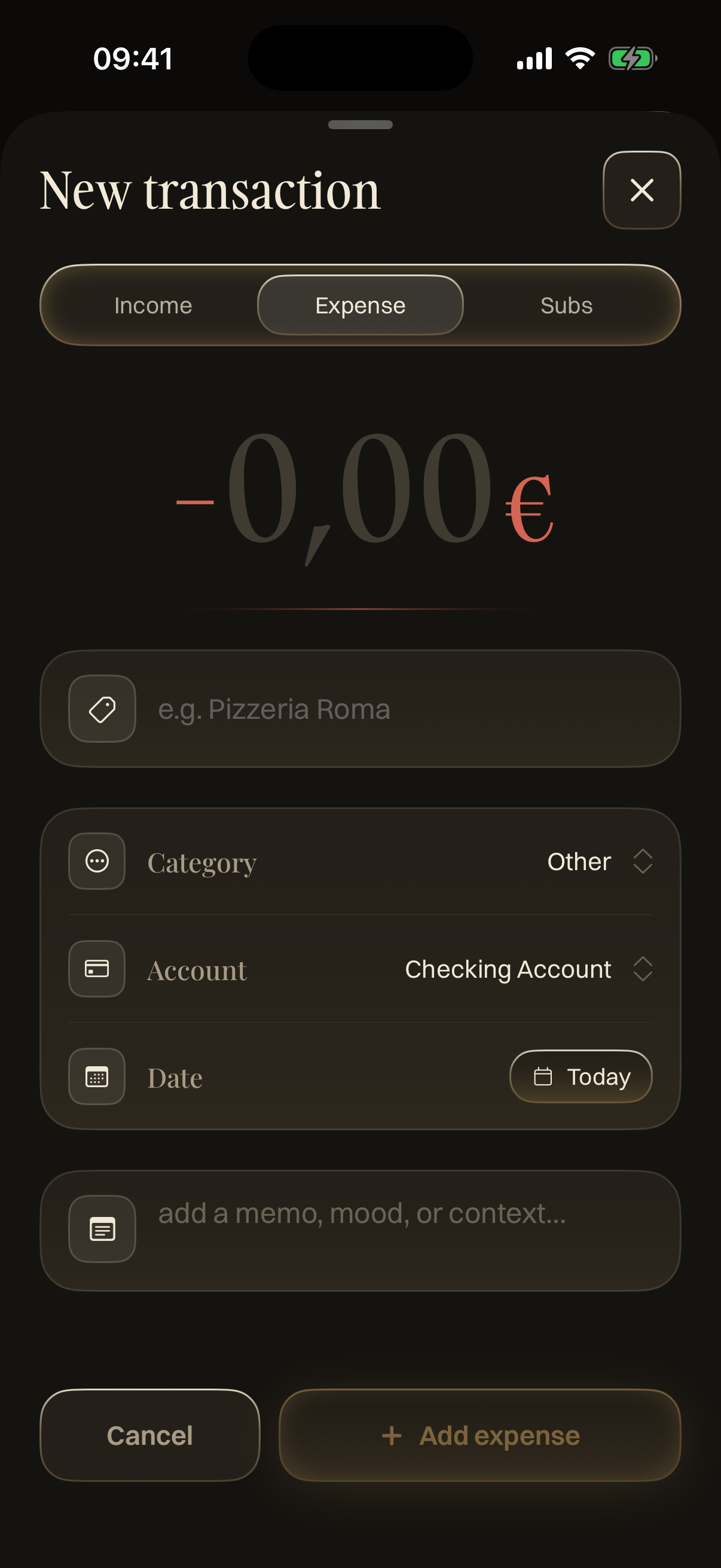
Finely new transaction form for income, expenses, and subscriptions.

Transaction Form

One form for income, expenses, and recurring subscriptions.

The form is where the storage model becomes visible. A one-off income or expense is saved as a SwiftData transaction, while a recurring subscription is saved as a subscription model that owns the recurrence rule, ongoing price, and materialization watermark. The form does not create future transactions in advance; it creates the series, then the transaction store materializes real charge rows only when they become due. That keeps history honest and lets each billed charge freeze its own amount even if the subscription price changes later.

Finely new transaction form showing the subscription mode where reminders can be configured.

Reminders

Notification scheduling rebuilt from current finance state.

The reminder system is deliberately centralized instead of being scheduled directly by the form. Each subscription stores only a reminder window, such as the number of days before the next charge. Global notification preferences and the send time live in application settings, while a notification scheduler owns the actual pending requests. Its reschedule pass clears the pending set and rebuilds it from current subscriptions, Pro status, authorization state, and user preferences. For due reminders it walks the next subscription cycles, skips fire dates that are already in the past, pre-queues a few upcoming reminders so the app does not need to be opened between charges, and caps the result below iOS's pending-notification limit.

Engineering

The interesting work is in the domain rules

Finely gives me a focused place to build product-level iOS systems outside a company codebase: persistence, monetization, recurrence, privacy, localization, and an assistant layer that must stay numerically correct.

UIKit-first architecture

Finely is built with programmatic UIKit, a Coordinator navigation layer, SwiftData persistence, and feature folders that keep Home, Timeline, Stats, Transaction Form, Transaction Details, Profile, and Assistant concerns separated.

Recurring finance logic

Subscriptions materialize charges idempotently from recurrence rules, preserve historical amounts once billed, and handle calendar edge cases such as month-end recurrence without drift.

Stats as an engine

The statistics screen is backed by service objects for period slicing, savings projection, subscription auditing, merchant/category summaries, and insight scoring, keeping the UIKit layer out of finance calculations.

WidgetKit boundary

The planned widget work is interesting because a finance widget should not mirror the full dashboard. It needs a smaller, privacy-aware model for glanceable state, masked amounts, freshness, and locked or Pro-only states.

App Intents workflow design

Future App Intents can expose actions such as adding an expense or checking upcoming subscriptions, but the intent layer should stay thin: typed parameters in, app-owned validation and finance logic underneath.

Foundation Models with app-owned facts

The Apple Foundation Models work should make the assistant more flexible without handing financial truth to generated text. The model can help with intent and phrasing; balances, totals, and conclusions still come from deterministic app services.
Free vs Pro

Monetization as product architecture

The free plan keeps the core tracker usable while limiting the number of user-created transactions. Pro removes that cap and unlocks advanced analysis, export, iCloud sync, reminders, and future assistant surfaces.

I built the entitlement rules as a single layer so screens can ask clear questions: can this user add another transaction, should this Pro row be locked, and should this background service run?

Assistant

A finance assistant that starts with facts

The current assistant answers guided questions from deterministic facts computed by the app: income, expenses, subscriptions, top categories, and leftover budget. That keeps the answers auditable before introducing a language model.

The important constraint is that balances, totals, and financial conclusions must come from app-owned facts, not from generated text. That boundary shapes the assistant architecture.